
This calculator helps you find the sample mean of any dataset without manual computations. Simply enter your data values as comma-separated, space-separated numbers, or even paste them directly from Excel, and click the Calculate button. The calculator will compute the sample mean and demonstrate how to calculate it by hand.
Enter your data values separated by commas, spaces, or new lines. You can also paste values directly from Excel. Then Click Calculate to get accurate answer with clear a explanation.
What is a Sample Mean?
The sample mean is the average of a set of sample data. It is one of the most useful statistics because it helps statisticians make inferences about the population, especially when the full data of the population is unavailable.
The symbol for the sample mean is x̄ and is pronounced as “x-bar.” It is distinct from the population mean symbol, μ (read as mu). Thus, to find the sample mean, you simply need to sum all the data points and divide the results by the number of data points in that sample.
What is the Sample Mean Formula?
The sample mean formula is x̄ = Σxi/n
where:
- x̄ is the sample mean symbol.
- Σxi is the sum of all values in the sample.
- n is the total number of data points (observations) in the sample.
In essence, to calculate the sample mean, you only need to sum all the values in a dataset and divide by the number of observations. This formula provides a concise and reliable measure of the central tendency of the sample data.
How to Calculate the Sample Mean
Want to learn how to compute the arithmetic mean manually, without the calculator? The process is straightforward and involves only 3 simple steps:
- Sum all the values in the sample. In the sample mean formula, this is the Σxi
- Count the number of observations to get the sample size (n)
- Divide the sum of all the values in the sample ( Σxi) by the number of observations in the sample (n) to get the sample mean (x̄)
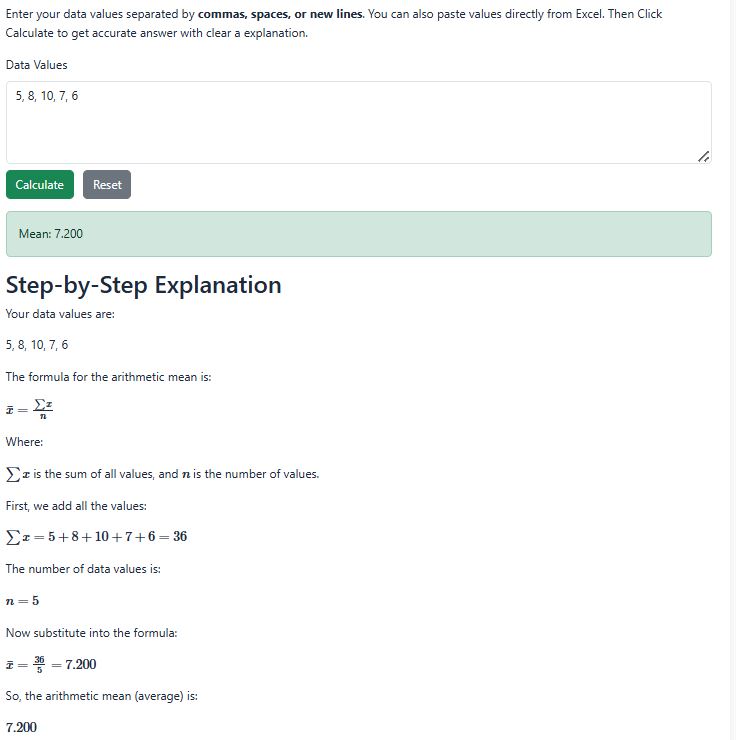
Example: Let’s say that you want to calculate the sample mean of the following sample data (5, 8, 10, 7, and 6). To calculate the arithmetic mean by hand, you need to follow these steps:
- Step 1: Sum all the values. That is: 5+8+10+7+6 = 36. Thus, Σxi = 36
- Step 2: Count the number of data points (observations) in the data. There are 5 data points. Hence, n = 5
- Step 3: Calculate the sample mean (x̄). Therefore, sample mean (x̄) = 36/5. This gives x̄ = 7.2
Alternatively, you can easily calculate the sample mean (x̄) using the calculator. You only need to enter the five data points (either as comma or space-separated values) in the calculator and click the calculate button. The calculator yields similar results as follows:
Sample Mean vs Population Mean
The sample mean and the population mean are both measures of central tendency. However, they differ in the scope of data they represent. While the sample mean measures the average of the subset of the population, the population mean represents the average of all values in the entire population.
| Feature | Sample Mean (x̄) | Population Mean (μ) |
|---|---|---|
| Definition | Average of a sample subset | Average of the entire population |
| Symbol | x̄ | μ |
| Number of Observations | n (sample size) | N (population size) |
| Usage | It provides an estimate of the population mean | It provides the true mean of the population |
| Calculation | The sample mean formula is: | The population mean formula is: |