
Want to calculate a z score from a raw score, mean, and standard deviation? Use the Z-score calculator. However, if you already have a z score and want to convert it back to a raw score, use the raw score calculator.
How to Use the Z Score Probability Calculator
Want to convert a z score to probability? This calculator can find several different probabilities under the standard normal curve. To use the calculator
- Choose the probability type that matches your question. Specifically, select:
- Probability less than z, P(Z < z), if you want to find the probability to the left of a z-score
- Probability greater than z, P(Z > z), if you want to find the probability to the right of a z-score
- Probability between 0 and z, if you want to find the probability between the mean and a z-score
- Probability between two z scores, P(z₁ < Z < z₂), if you want to find the probability between two z scores
- Probability outside two z scores, P(Z < z₁ or Z > z₂), if you want to find the combined probability in both tails
- Enter the required z score or z scores.
- Click Calculate.
The calculator gives the probability, explains what the answer means, and shades the corresponding area under the standard normal curve. It also provides a step-by-step solution showing how to find the same probability manually using the z table.
Note: You can enter positive or negative z scores. If you choose a probability between or outside two z scores, enter both values. You do not need to enter them in order because the calculator automatically identifies the lower and upper z scores.
What Is a Z Score Probability?
A z-score probability is the area under the standard normal curve associated with a particular z score or range of z scores. On the other hand, a z score tells you how far a value is from the mean in standard deviation units.
For example:
- z = 0 means the value is exactly at the mean.
- z = 1 means the value is one standard deviation above the mean.
- z = -2 means the value is two standard deviations below the mean.
The standard normal distribution has:
- Mean = 0
- Standard deviation = 1
- Total area under the curve = 1
Because probability is represented by area under the curve, a probability of 0.9332 means that 93.32% of the total area is included.
For example: P(Z < 1.50) = 0.9332 means that approximately 93.32% of values in the standard normal distribution fall below z = 1.50.
The exact probability you calculate depends on the part of the normal curve you need. You may need the probability below z, above z, between two z scores, or outside two z scores.
How to Calculate Probability from a Z Score
To find probability from a z-score, you can either use our z-score probability calculator or find it manually using a standard normal table.
A standard normal table (z-table) gives the area under the standard normal curve associated with a z-score. The StatCalc z table gives the cumulative probability to the left of z (i.e., P(Z < z)).
Therefore, to manually find probability from a z-score using the z-score table, follow these steps:
- Find the z score. If your question already gives a z score, you can use it directly. However, if you are starting with a raw score, mean, and standard deviation, first calculate the z score using the Z-score calculator.
- Look up the z score in the z table. Find the row containing the ones and tenths digits of the z score, then move across to the column containing the hundredths digit.
- Read the probability from the table. The value where the row and column meet gives the cumulative probability to the left of the z score, P(Z < z).
- Adjust the probability for the area you need. Whether you use the table value directly or perform another calculation depends on the probability asked for.
The most common situations are:
- Probability less than z, P(Z < z). Use the cumulative probability from the z table directly.
- Probability greater than z, P(Z > z). Subtract the cumulative probability obtained from the z-table from 1.
- Probability between 0 and z. Find the difference between the cumulative probability for z and 0.5000.
- Probability between two z scores, P(z₁ < Z < z₂). Find the cumulative probability for both z scores and subtract the smaller probability from the larger probability.
- Probability outside two z scores, P(Z < z₁ or Z > z₂). Find the probabilities in the two outside tails and add them, or find the probability between the two z scores and subtract it from 1.
Want to learn more about converting a z-score to probability? The following section shows you how to find probabilities from z-score (s) using a z-table with clear examples.
1. Probability Less Than a Z Score: P(Z < z)
A probability less than a z score represents the area to the left of z in a standard normal curve. This is the most direct probability to find with a cumulative z table because the table already gives P(Z < z).
Therefore, to find the probability less than a z score using the table:
- Split the z score into tenths and hundredths places.
- Match the tenths row with the hundredths column.
- Read the probability value at their intersection.
Example 1: Probability to the Left of a Z Score
A statistics exam has a mean score of 70 and a standard deviation of 10. A student scored 85. What percentage of students scored less than 85?
Solution
From the question, we know that:
- Raw score: x = 85
- Mean: μ = 70
- Standard deviation: σ = 10
We need to find P(X < 85). As you can see, we have a raw score rather than a z score. Thus, we need to convert the raw score to a z score before finding the correct probability using a z table.
To convert the raw score to z, we use the formula: z = (x − μ) / σ
Substituting the values into the formula gives: z = (85 − 70) / 10
= 1.50
Therefore, z = 1.50, and we need to use the z table to find P(Z < 1.50).
To find this probability from a standard normal table, follow these steps:
Step 1. Split the z score into tenths and hundredths places.
For z = 1.50, the tenths part is 1.5 and the hundredths part is 0.00.
Step 2. Match the tenths row with the hundredths column.
Using a z table, locate 1.5 in the left-hand row and 0.00 in the top column.
Step 3. Read the probability.
The probability less than z = 1.50 is the value where the 1.5 row and 0.00 column meet. This gives: P(Z < 1.50) = 0.9332, as shown below.
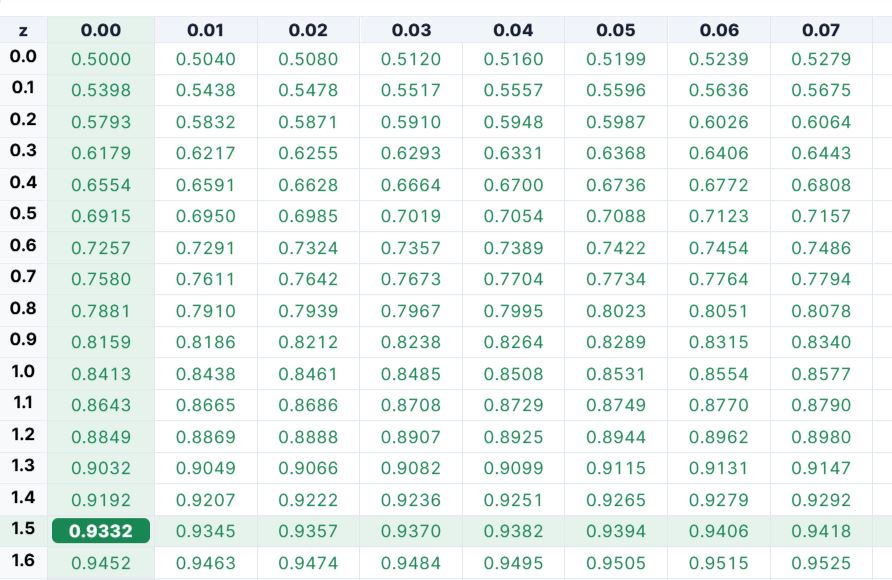
Therefore, about 93.32% of students scored less than 85.
To verify the result using the calculator:
- Select Probability less than z, P(Z < z).
- Enter 1.50 as the z score.
- Click Calculate.
The calculator will instantly return: P(Z < 1.50) = 0.9332 (similar to z-table result).
2. Probability Greater Than a Z Score: P(Z > z)
A probability greater than a z score represents the area to the right of z in a standard normal curve. Since a cumulative z table gives the probability to the left of z, P(Z < z), we need to subtract the table value from 1 to find the probability to the right.
Therefore, to find the probability greater than a z score using the table:
- Split the z score into tenths and hundredths places.
- Match the tenths row with the hundredths column.
- Read the probability value at their intersection.
- Subtract the probability from 1 to find P(Z > z).
Example 2: Probability to the Right of a Z Score
The weights of a certain product are normally distributed with a mean of 50 grams and a standard deviation of 4 grams. What is the probability that a randomly selected product weighs more than 56 grams?
Solution
From the question, we know that:
- Raw value: x = 56
- Mean: μ = 50
- Standard deviation: σ = 4
We need to find P(X > 56). Since we have a raw value rather than a z-score, we first need to convert 56 grams to a z-score.
To convert the raw value to z, we use the formula: z = (x − μ) / σ
Substituting the values into the formula gives:
z = (56 − 50) / 4
= 1.50
Therefore, z = 1.50, and we need to use the z table to find P(Z > 1.50).
Since the cumulative z table gives the probability to the left, we first find P(Z < 1.50) and then subtract it from 1.
Step 1. Split the z score into tenths and hundredths places.
For z = 1.50, the tenths part is 1.5 and the hundredths part is 0.00.
Step 2. Match the tenths row with the hundredths column.
Locate 1.5 in the left-hand row and 0.00 in the top column of the z table.
Step 3. Read the probability.
The value where the 1.5 row and 0.00 column meet is: P(Z < 1.50) = 0.9332 (similar to example 1 result)
However, this is the probability to the left of z = 1.50. We need the probability to the right.
Step 4. Subtract the probability from 1.
P(Z > 1.50) = 1 − P(Z < 1.50)
= 1 − 0.9332
= 0.0668
Therefore, the probability that a randomly selected product weighs more than 56 grams is 0.0668, or 6.68%.
To verify the result using the calculator:
- Select Probability greater than z, P(Z > z).
- Enter 1.50 as the z score.
- Click Calculate.
The calculator will instantly return: P(Z > 1.50) = 0.0668.
3. Probability Between 0 and a Z Score
The probability between 0 and a z score represents the area between the mean and z in the standard normal curve. Since z = 0 is the center of the distribution, the cumulative probability to its left is 0.5000.
Therefore, to find the probability between 0 and a z score using a cumulative z table:
- Split the z score into tenths and hundredths places.
- Match the tenths row with the hundredths column.
- Read the cumulative probability at their intersection.
- Find the difference between the table probability and 0.5000.
Tip. For a positive z score, subtract 0.5000 from the table value, and for a negative z score, subtract the table value from 0.5000.
Example 3: Probability Between 0 and a Negative Z Score
The daily time spent on a learning app is normally distributed with a mean of 60 minutes and a standard deviation of 12 minutes. A student uses the app for 48 minutes. What proportion of users spend between 48 minutes and the mean time of 60 minutes?
Solution
From the question, we know that:
- Lower raw value: x₁ = 48
- Upper raw value: x₂ = 60
- Mean: μ = 60
- Standard deviation: σ = 12
We need to find P(48 < X < 60).
Since the values are given as raw scores, we first convert them to z scores.
For x₁ = 48: z₁ = (48 − 60) / 12
= -1.00
For x₂ = 60: z₂ = (60 − 60) / 12
= 0
Therefore, we need to find: P(-1.00 < Z < 0)
To find this probability using the z table, follow these steps:
Step 1. Split the z score into tenths and hundredths places.
For z = -1.00, the tenths part is -1.0 and the hundredths part is 0.00.
Step 2. Match the tenths row with the hundredths column.
Locate -1.0 in the left-hand row and 0.00 in the top column.
Step 3. Read the probability.
The cumulative probability at their intersection is: P(Z < -1.00) = 0.1587, as shown below.
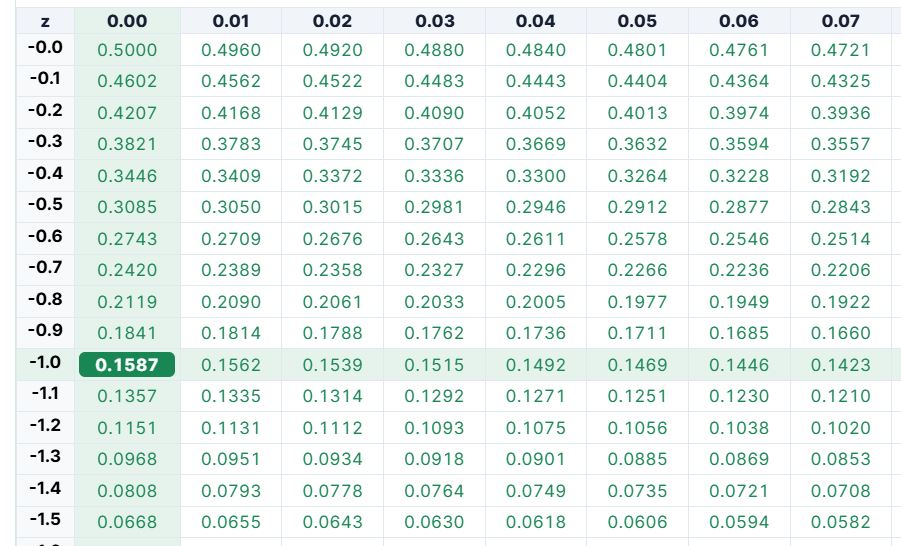
Step 4. Find the probability between -1.00 and 0.
We also know that the cumulative probability to the left of z = 0 is: P(Z < 0) = 0.5000
Subtracting the probability below -1.00 from 0.500, we get: P(-1.00 < Z < 0) = 0.5000 − 0.1587
= 0.3413
Therefore, the proportion of users who spend between 48 minutes and the mean time of 60 minutes is 0.3413, or 34.13%.
To verify the result using the calculator:
- Select Probability between 0 and z.
- Enter -1.00 as the z score.
- Click Calculate.
The calculator will instantly return: P(-1.00 < Z < 0) = 0.3413
4. Probability Between Two Z Scores: P(z₁ < Z < z₂)
A probability between two z scores represents the area between a lower z score and an upper z score under the standard normal curve.
Since the cumulative z table gives the probability to the left of each z score, we find both probabilities and subtract the probability for the lower z score from the probability for the upper z score.
Therefore, to find the probability between two z scores using the table:
- Find the cumulative probability for the lower z score.
- Find the cumulative probability for the upper z score.
- Subtract the lower cumulative probability from the upper cumulative probability.
In other words: P(z₁ < Z < z₂) = P(Z < z₂) − P(Z < z₁)
Example 4: Probability Between Two Z Scores
The heights of adult men in a city are normally distributed with a mean of 175 cm and a standard deviation of 7 cm. What is the probability that a randomly selected man is between 168 cm and 185 cm tall?
Solution
From the question, we know that:
- Lower value: x₁ = 168
- Upper value: x₂ = 185
- Mean: μ = 175
- Standard deviation: σ = 7
We need to find: P(168 < X < 185)
Since we have raw values rather than z scores, we first convert both values to z scores.
For x₁ = 168: z₁ = (168 − 175) / 7
= -1.00
For x₂ = 185: z₂ = (185 − 175) / 7
= 1.43
Therefore, we need to find: P(-1.00 < Z < 1.43)
To find this probability using a z table, follow these steps:
Step 1. Find the probability for the lower z score.
For z = -1.00, locate the -1.0 row and 0.00 column.
The table gives: P(Z < -1.00) = 0.1587 (see example 3 screenshot)
Step 2. Find the probability for the upper z score.
For z = 1.43, locate the 1.4 row and 0.03 column. The table gives: P(Z < 1.43) = 0.9236, as shown below.
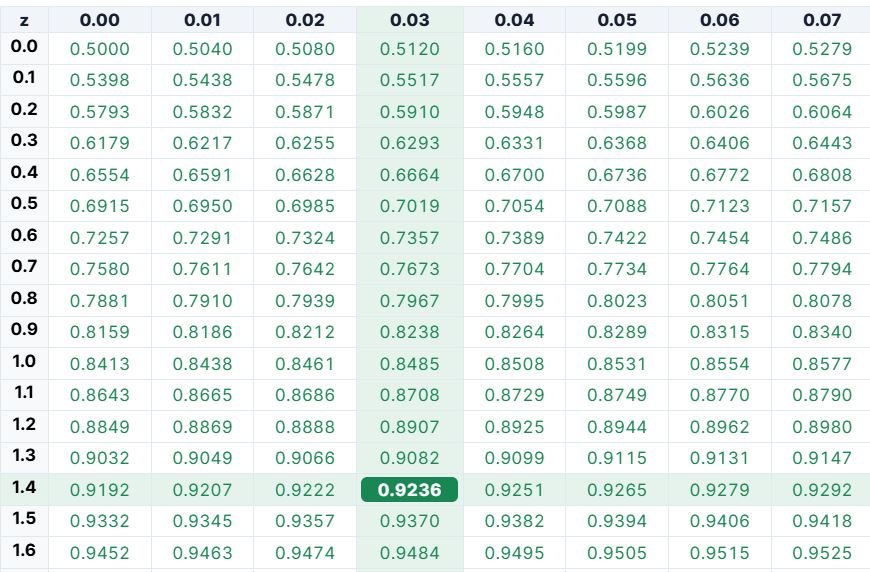
Step 3. Subtract the lower probability from the upper probability.
Therefore, P(-1.00 < Z < 1.43) = 0.9236 − 0.1587
= 0.7649
This implies that the probability is approximately 0.7649, or 76.49%.
To verify the result using the calculator:
- Select Probability between two z scores, P(z₁ < Z < z₂).
- Enter -1.00 as the first z score.
- Enter 1.43 as the second z score.
- Click Calculate.
The calculator returns approximately: P(-1.00 < Z < 1.43) = 0.7650
Therefore, about 76.50% of adult men have heights between 168 cm and 185 cm.
Note: The z-table answer and calculator answer differ slightly because z tables usually round cumulative probabilities to four decimal places, while the calculator uses more precise values before rounding the final answer.
5. Probability Outside Two Z Scores: P(Z < z₁ or Z > z₂)
The probability outside two z scores represents the combined area below the lower z score and above the upper z score.
Using a cumulative z table, we can find the probability in each tail separately and then add them together. Therefore, to find the probability outside two z scores:
- Find the cumulative probability below the lower z score.
- Find the cumulative probability below the upper z score.
- Subtract the upper cumulative probability from 1 to get the right-tail probability.
- Add the lower-tail and right-tail probabilities.
In other words: P(Z < z₁ or Z > z₂) = P(Z < z₁) + P(Z > z₂)
Example 5: Probability Outside Two Z Scores
A machine fills bottles with a mean volume of 500 ml and a standard deviation of 5 ml. Bottles are rejected if they contain less than 490 ml or more than 510 ml. What proportion of bottles will be rejected?
Solution
From the question, we know that:
- Lower cutoff: x₁ = 490
- Upper cutoff: x₂ = 510
- Mean: μ = 500
- Standard deviation: σ = 5
We need to find: P(X < 490 or X > 510)
Since the cutoff values are given as raw values, we first convert both to z scores.
For x₁ = 490: z₁ = (490 − 500) / 5
= -2.00
For x₂ = 510: z₂ = (510 − 500) / 5
= 2.00
Therefore, we need to find: P(Z < -2.00 or Z > 2.00)
To find this probability using a z table:
Step 1. Find the probability below the lower z score.
For z = -2.00, locate the -2.0 row and 0.00 column.
The table gives: P(Z < -2.00) = 0.0228, as shown below. This is the probability in the lower tail.
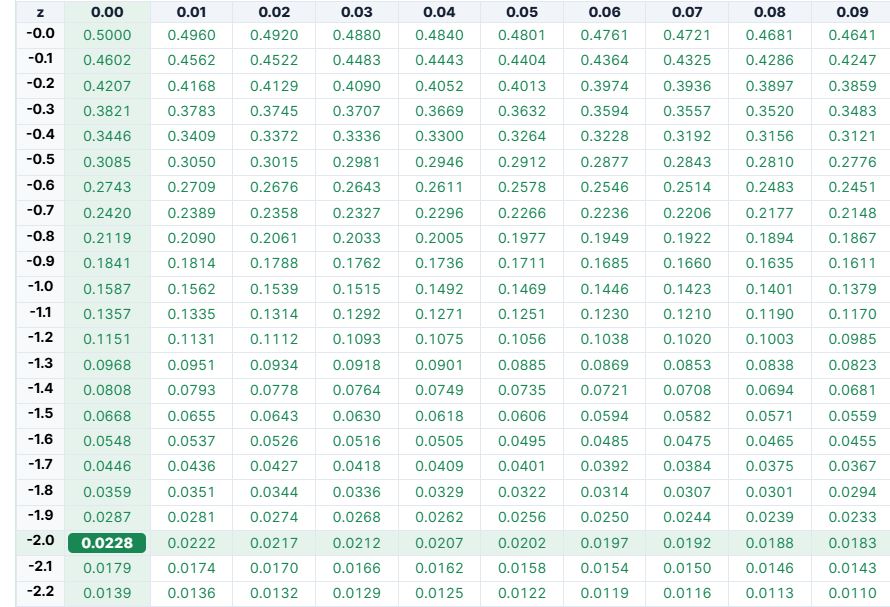
Step 2. Find the cumulative probability for the upper z score.
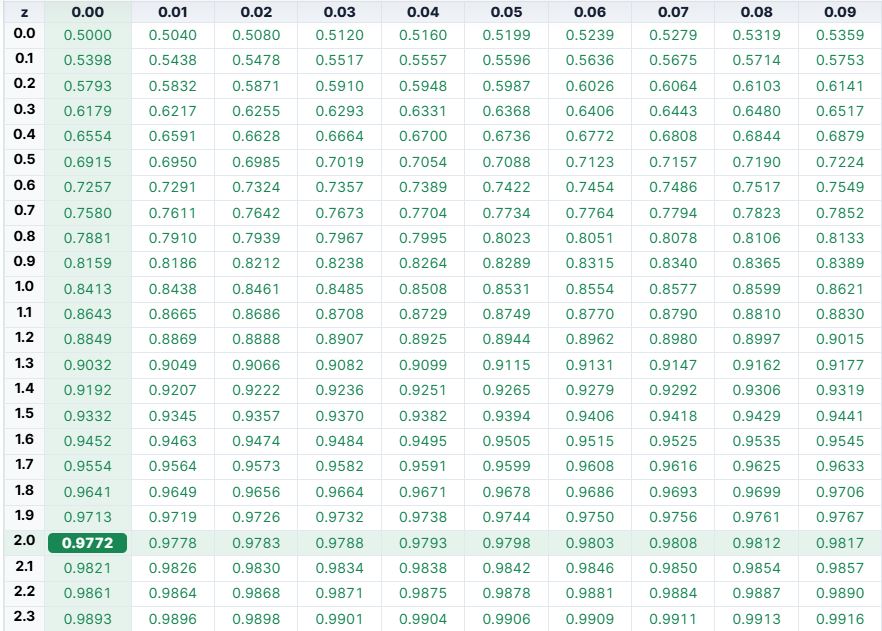
For z = 2.00, locate the 2.0 row and 0.00 column. The table gives: P(Z < 2.00) = 0.9772, as shown below.
Step 3. Find the probability above z = 2.00.
Since we need the area to the right: P(Z > 2.00) = 1 − 0.9772
= 0.0228
Step 4. Add the two outside probabilities.
P(Z < -2.00 or Z > 2.00) = 0.0228 + 0.0228
= 0.0456
Therefore, using the z table, approximately 4.56% of bottles will be rejected.
To verify the result using the calculator:
- Select Probability outside two z scores, P(Z < z₁ or Z > z₂).
- Enter -2.00 as the first z score.
- Enter 2.00 as the second z score.
- Click Calculate.
The calculator returns approximately: P(Z < -2.00 or Z > 2.00) = 0.0455
Therefore, approximately 4.55% of bottles will be rejected.
Note: The small difference between 0.0456 from the z table and 0.0455 from the calculator occurs because the z table rounds each tail probability to four decimal places. The calculator uses more precise normal-distribution probabilities before rounding the final answer.
Normal Distribution and Z Scores
The normal distribution is a bell-shaped, symmetric distribution. Many real-world measurements, such as test scores, heights, weights, and product measurements, are often modeled using a normal or approximately normal distribution.
A normal distribution is described by two main values:
- Mean (μ), which gives the center of the distribution
- Standard deviation (σ), which shows how spread out the values are
To use the z-score probability calculator with a normal distribution word problem, you usually convert the raw value to a z score using the formula: z = (x − μ) / σ. Alternatively, you can quickly calculate z values using the z-score calculator.
After finding the z score, use this calculator to find the required area under the curve.
The 68-95-99.7 Rule
The 68-95-99.7 rule is a quick way to understand probabilities in a normal distribution.
It says that approximately:
- 68% of values fall between z = -1 and z = 1
- 95% of values fall between z = -2 and z = 2
- 99.7% of values fall between z = -3 and z = 3
This rule is only an approximation, but it helps you understand whether a z-score is common or unusual.
For exact probabilities, use the calculator instead of relying only on the rule. You can also use the empirical rule calculator if solving empirical rule problems.
Frequently Asked Questions
A z-score probability calculator is a free online tool that finds the area under the standard normal curve for a given z score. It can calculate left-tail, right-tail, between, and outside probabilities.
Choose P(Z < z), enter the z score, and click Calculate. The result is the cumulative area to the left of that z score.
Choose P(Z > z) and enter the z score. The calculator finds the right-tail probability by subtracting the left-tail probability from 1.
Choose P(z₁ < Z < z₂) and enter both z scores. The calculator subtracts the cumulative probability of the lower z score from the cumulative probability of the upper z score.
Choose Outside z₁ and z₂ and enter the two z scores. The calculator adds the left-tail area below the lower z score and the right-tail area above the upper z score.
Yes. You can enter positive or negative z scores. Negative z scores are below the mean, while positive z scores are above the mean.
Yes. In the standard normal distribution, probability is represented by the area under the curve. For example, an area of 0.95 means a probability of 95%.
