How to Use the Arithmetic Mean Calculator
This arithmetic mean calculator helps you find the arithmetic mean for three common types of data: ungrouped data, frequency table data, and grouped data with class intervals. The calculator also shows the formula and step-by-step solution to help you learn exactly how the arithmetic mean was computed for your data.
To use the calculator:
- Select the data type. You should choose ungrouped data if the data is listed one by one, a frequency table if each value has a frequency, and class intervals if your data is grouped into intervals such as 50–59, 60–69, and 70–79, each with its corresponding frequency.
- Enter your data. For ungrouped data, enter the raw values separated by commas, spaces, tabs, or line breaks. For frequency table data, enter one value and its frequency per line, and for class intervals data, enter the lower limit, upper limit, and frequency per line. All of the options also allow you to paste values directly from Excel.
- Click Calculate.
The calculator will instantly return the arithmetic mean, x̄, and show the steps used to get the answer.
Want to calculate the sample or population mean, each with correct statistical notations and steps? Use the mean calculator. However, if you aim to understand how spread out your values are after finding the mean, our standard deviation calculator might be useful.
Example 1: Find the Arithmetic Mean of Ungrouped Data
Suppose the following values represent the time, in minutes, taken by 6 students to complete a short quiz: 21.4, 22.1, 19.8, 23.5, 20.7, 24.0. Find the arithmetic mean.
Solution
To find the arithmetic mean using the calculator:
- Select the Ungrouped data option.
- Copy and paste the data values into the input field
- Click Calculate.
The calculator will instantly return the arithmetic mean as x̄ = 21.916667. It will also show how the mean was computed for this dataset, step-by-step.
Example 2: Find the Arithmetic Mean of a Frequency Table
Suppose a teacher records the number of students who obtained different scores in a short quiz:
| Score, x | Frequency, f |
|---|---|
| 5 | 3 |
| 10 | 4 |
| 15 | 6 |
| 20 | 2 |
Find the arithmetic mean.
Solution
To find the arithmetic mean using the calculator:
- Select the Frequency table option
- Copy and paste the data values from the above table into the input field (Do not copy the header).
- Click Calculate
The calculator will return the arithmetic mean for the frequency table as: Arithmetic mean, x̄ = 12.333333. It will also show you how the mean was computed manually, step by step.
Example 3: Find the Arithmetic Mean of Class Intervals
Suppose a grouped frequency table shows the following exam score intervals and frequencies:
| Class interval | Frequency, f |
|---|---|
| 50–59 | 5 |
| 60–69 | 8 |
| 70–79 | 10 |
| 80–89 | 4 |
Find the arithmetic mean for the dataset.
Solution
To find the arithmetic mean using the calculator:
- Select the Class intervals option.
- Copy and paste the data values from the above table into the input field (do not copy the header).
- Click Calculate
The calculator will return the arithmetic mean of the class interval data as: Estimated arithmetic mean, x̄ = 69.314815. It will also show you how to find this mean manually, by applying the right formula, substituting the values, and solving.
What Is Arithmetic Mean?
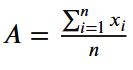
The arithmetic mean is the ordinary average of a set of numbers. Thus, you can simply find the arithmetic mean by adding all values and dividing the result by the number of observations.
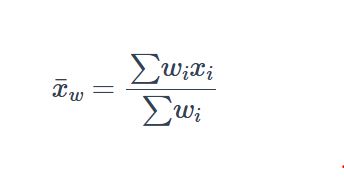
In many basic statistics problems, the words mean, average, and arithmetic mean are used interchangeably. However, the term arithmetic mean is more precise because it tells us the exact type of mean being used. This matters because the arithmetic mean is only one type of mean. Other types include the geometric mean, harmonic mean, and weighted mean. These are calculated differently and are useful in different situations.
Arithmetic Mean Formula for Ungrouped Data
For ungrouped data, the arithmetic mean formula is: x̄ = (X1 + X2 + … + Xn) / n
where:
- x̄ is the arithmetic mean, pronounced as x-bar.
- X1, X2, …, Xn are the individual values in the dataset.
- n is the total number of observations in the dataset.
The formula suggests that you add all the values and divide by the number of values to get the arithmetic mean of ungrouped data.
How to Find the Arithmetic Mean for Ungrouped Data by Hand
Ungrouped data are raw values listed one by one. To calculate the arithmetic mean for ungrouped data manually, follow these steps:
- Add all the data values.
- Count the number of observations to get n.
- Divide the total by n to get the arithmetic mean, x̄.
Example
A researcher records the following waiting times, in minutes, for 8 customers: 4, 6, 5, 8, 7, 9, 6, 3. Find the arithmetic mean waiting time.
Solution
Since these are raw data values, we use the arithmetic mean formula for ungrouped data and follow these steps:
Step 1: Add all the data values.
The sum of all values in the dataset is: 4 + 6 + 5 + 8 + 7 + 9 + 6 + 3
= 48
Step 2: Count the number of observations.
There are 8 values in the dataset. Thus, n = 8
Step 3: Apply the Arithmetic mean formula for ungrouped data
By definition, the arithmetic mean formula is: x̄ = (X1 + X2 + … + Xn) / n
Substituting the values into the formula and solving gives: x̄ = 48 / 8
= 6
Therefore, the arithmetic mean is x̄ = 6. This means that the average waiting time is 6 minutes.
Arithmetic Mean Formula for a Frequency Table
A frequency table shows each value together with the number of times it occurs. In this case, the usual arithmetic mean formula needs to be adjusted to account for the frequency.
Therefore, the arithmetic mean formula for a frequency table becomes:
Arithmetic mean, x̄ = Σfx / Σf
Where:
- x̄ is the arithmetic mean.
- x is each value in the frequency table.
- f is the frequency of each value.
- fx is the product of each value and its frequency.
- Σfx is the sum of all fx values.
- Σf is the total frequency.
This formula gives the same result you would get if you wrote every repeated value separately and calculated the ordinary arithmetic mean.
How to Find the Arithmetic Mean from a Frequency Table by Hand
To calculate the arithmetic mean from a frequency table manually, follow these steps:
- Multiply each value, x, by its frequency, f, to get fx.
- Add all fx values to get Σfx.
- Add all frequencies to get Σf.
- Divide Σfx by Σf to get the arithmetic mean, x̄.
Example
The table below shows the number of books read by students in one month.
| Number of books, x | Frequency, f |
|---|---|
| 1 | 4 |
| 2 | 7 |
| 3 | 6 |
| 4 | 3 |
Find the arithmetic mean number of books read.
Solution
To find the arithmetic mean for the frequency table data manually, we follow these steps:
Step 1: Multiply each value by its frequency to get fx
| x | f | fx |
|---|---|---|
| 1 | 4 | 4 |
| 2 | 7 | 14 |
| 3 | 6 | 18 |
| 4 | 3 | 12 |
Step 2: Add the fx values to get Σfx.
Therefore, Σfx = 4 + 14 + 18 + 12
= 48
Therefore, Σfx = 48
Step 3: Add the frequencies to get Σf
Thus, Σf = 4 + 7 + 6 + 3
= 20
This means that Σf = 20
Step 4: Apply the arithmetic mean formula for the frequency table.
By definition, the formula is: x̄ = Σfx / Σf
Substituting the values into the formula and solving gives:
x̄ = 48 / 20
= 2.4
Therefore, the arithmetic mean is x̄ = 2.4. This means the students read an average of 2.4 books during the month.
Arithmetic Mean Formula for Class Intervals
Class intervals are used when data are grouped into ranges. For example, instead of listing every score separately, a table may show intervals such as 10–19, 20–29, and 30–39.
When data are grouped into class intervals, the exact original values are usually not known. Because of this, we first find the midpoint of each class interval and use it as a representative value for that class.
The midpoint formula is: m = (lower limit + upper limit) / 2.
Therefore, for class intervals data, the estimated arithmetic mean formula is: x̄ = Σfm / Σf
Where:
- x̄ is the estimated arithmetic mean.
- m is the class midpoint.
- f is the frequency of each class interval.
- fm is the product of each midpoint and its frequency.
- Σfm is the sum of all fm values.
- Σf is the total frequency.
This is called an estimated arithmetic mean because we are using class midpoints instead of the original raw values.
How to Find the Arithmetic Mean for Class Intervals by Hand
To calculate the arithmetic mean for a dataset with class intervals manually, follow these steps:
- Find the midpoint of each class interval.
- Multiply each midpoint, m, by its frequency, f, to get fm.
- Add all fm values to get Σfm.
- Add all frequencies to get Σf.
- Divide Σfm by Σf to get the estimated arithmetic mean, x̄.
Example
The table below shows the marks obtained by students in a test.
| Marks | Frequency, f |
|---|---|
| 0–20 | 3 |
| 20–40 | 6 |
| 40–60 | 8 |
| 60–80 | 5 |
| 80–100 | 2 |
Find the estimated arithmetic mean mark.
Solution
Since the data are grouped into class intervals, we can manually find the estimated arithmetic mean mark as follows:
Step 1: Find the midpoint
By definition, midpoint, m = (lower limit + Upper Limit)/2
For instance, the midpoint for the class 0 – 20 is (0+20)/2
=20/2
=10.
You can follow the same procedure and fill in the midpoint column. Once you’ve the midpoint, m, multiply it by f to get fm
| Marks | Midpoint, m | Frequency, f |
|---|---|---|
| 0–20 | 10 | 3 |
| 20–40 | 30 | 6 |
| 40–60 | 50 | 8 |
| 60–80 | 70 | 5 |
| 80–100 | 90 | 2 |
Step 2. Multiply the midpoint, m, by the frequency, f, to get fm
The table becomes:
| Marks | Midpoint, m | Frequency, f | fm |
|---|---|---|---|
| 0–20 | 10 | 3 | 30 |
| 20–40 | 30 | 6 | 180 |
| 40–60 | 50 | 8 | 400 |
| 60–80 | 70 | 5 | 350 |
| 80–100 | 90 | 2 | 180 |
Step 3: Add the fm values to get Σfm
Therefore, Σfm = 30 + 180 + 400 + 350 + 180
= 1140
Step 4: Add the frequencies to get Σf
Thus, Σf = 3 + 6 + 8 + 5 + 2
= 24
Step 5: Apply the formula.
By definition, the estimated arithmetic mean formula for grouped data with class intervals is: x̄ = Σfm / Σf
Substituting the values and solving gives: x̄ = 1140 / 24
= 47.5
Therefore, the estimated arithmetic mean is x̄ = 47.5. This means that the estimated average mark is 47.5.
Frequently Asked Questions
This arithmetic mean calculator finds the arithmetic mean of ungrouped data, frequency table data, and grouped data with class intervals. It also shows the formula and step-by-step solution.
In most basic statistics problems, yes. The arithmetic mean is the ordinary average found by adding all values and dividing by the number of values.
The arithmetic mean is one type of mean. In beginner statistics, the word mean often refers to the arithmetic mean, but there are other types of mean, such as geometric mean, harmonic mean, and weighted mean.
Ungrouped data are raw values listed one by one. However, the frequency table data show each value together with the number of times it occurs. For example, instead of writing 10 three times, a frequency table can show x = 10 and f = 3.
A frequency table may list exact values with their frequencies. On the other hand, class intervals group values into ranges, such as 10–19 or 20–29. For class intervals, the calculator uses the midpoint of each interval to estimate the arithmetic mean.
It is called estimated because the original raw values are not known. The calculator uses the midpoint of each class interval as a representative value, so the result is an estimate of the arithmetic mean.