
Chi-Square Table (χ² Critical Value Table)
What Is a Chi-Square Table?
A chi-square table, also called a chi-square critical value table or chi-square distribution table, is used to find critical values from the chi-square (χ²) distribution.
The critical value depends on two things:
- the degrees of freedom (df)
- the probability shown at the top of the table
Our table uses right-tail probabilities. This means each probability at the top represents the area of the chi-square distribution that lies to the right of the corresponding critical value.
You may also see a chi-square table written as a χ² table, X² table, or x2 table. These names generally refer to the same type of statistical table.
Chi-square critical values are commonly used in chi-square goodness-of-fit tests, tests of independence, tests of homogeneity, and statistical problems involving a population variance or standard deviation.
How to Read the Chi-Square Table
The degrees of freedom are listed down the first column, while the right-tail probabilities are shown across the top.
To find a chi-square critical value using the table:
- Identify the type of test and significance level, α.
- Convert α to the right-tail probability used by the table.
- Find the degrees of freedom in the first column.
- Locate the value where the df row and probability column meet.
The probability used in Step 2 depends on the type of test.
| Test type | Probability to use in the table |
|---|---|
| Right-tailed | α |
| Left-tailed | 1 − α |
| Two-tailed: lower critical value | 1 − α/2 |
| Two-tailed: upper critical value | α/2 |
For example, if α = 0.05:
- a right-tailed test uses the 0.05 column
- a left-tailed test uses the 1- 0.05 = 0.95 column
- a two-tailed test uses the 1- 0.05/2 = 0.975 and 0.05/2 = 0.025 columns
If the degrees of freedom are not provided in the question, calculate them before using the table. You can also use the Degrees of Freedom Calculator to verify your result.
How to Find a Right-Tailed Chi-Square Critical Value
Most chi-square goodness-of-fit tests, tests of independence, and tests of homogeneity are right-tailed. For a right-tailed test, the right-tail probability shown in the table is simply the significance level, α.
Example 1. Right-Tailed Chi-Square Critical Value
A high school counselor wants to determine whether students’ preferred study method is associated with grade level. A random sample of students is classified into three grade levels and four study methods. The counselor plans to perform a chi-square test of independence using α = 0.05.
Find the chi-square critical value for the test.
Solution
To find the correct chi-square critical value for the test using the table, follow these steps:
Step 1: Identify the type of test and significance level.
This is a chi-square test of independence question, which is right-tailed. We also know that the significance level is α = 0.05
Step 2: Convert α to the right-tail probability used by the table.
Since this is a right-tailed test, no conversion is required. Therefore, we use the α = 0.05 column.
Step 3: Find the degrees of freedom.
For a chi-square test of independence: df = (r − 1)(c − 1), where r is the number of rows and c the number of columns in the contingency table resulting from the chi-square test.
From the question, we know that there are 3 grade-level categories and 4 study-method categories. Hence, r = 3 and c= 4.
Therefore, df = (3 − 1)(4 − 1)
= 2 × 3
= 6
Step 4: Locate the critical value in the table.
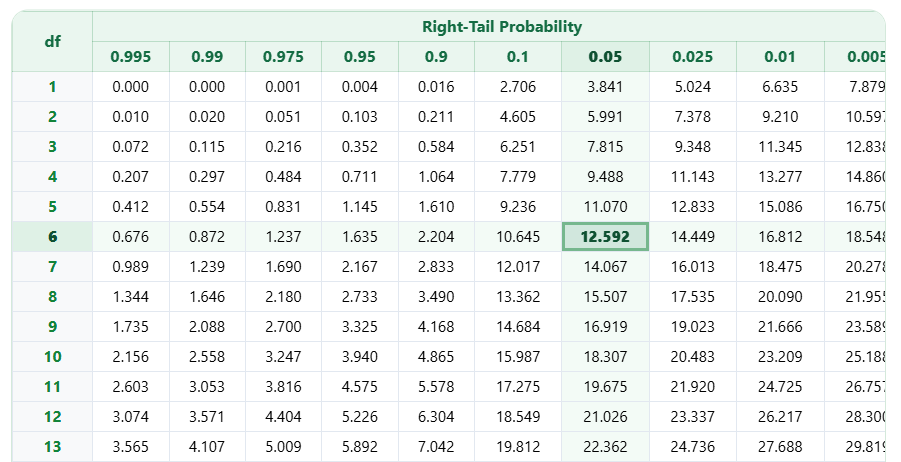
To locate the critical value from the chi-square table, find df = 6 in the first column and move across the row to the 0.05 probability column.
The value where the row and column meet is: χ² critical value = 12.592, as shown below. Therefore, the chi-square critical value for the test is: χ20.05, 6 = 12.592.
How to Find a Left-Tailed Chi-Square Critical Value
Left-tailed chi-square critical values are mainly used in problems involving a population variance or standard deviation. For a left-tailed test, α represents the area to the left of the critical value. However, the table above gives probabilities to the right.
Therefore, before finding the critical value, we need to convert α using: Right-tail probability = 1 − α.
Example 2. Left-Tailed Chi-Square Critical Value
A juice-filling machine has historically produced bottles with a population standard deviation of 2.5 mL. After the machine is recalibrated, a quality-control manager takes a random sample of 16 bottles and wants to test whether the population standard deviation has decreased. The test will be conducted at α = 0.05.
Find the chi-square critical value.
Solution
To find the correct chi-square critical value for the test, follow these steps:
Step 1: Identify the type of test and significance level.
The manager wants to determine whether the population variability has decreased. Therefore, this is a left-tailed test.
We also know that the significance level, α = 0.05
Step 2: Convert α to the right-tail probability used by the table.
For a left-tailed test: Right-tail probability = 1 − α
Substituting α = 0.05 into the formula: Right-tail probability = 1 − 0.05
= 0.95
Therefore, we use the 0.95 column when looking up the critical value.
Step 3: Find the degrees of freedom.
For a test involving one population variance or standard deviation, the degrees of freedom, df = n − 1.
From the question, we know that the sample contains 16 bottles. Hence, n = 16
Therefore, df = 16 − 1
= 15
Step 4: Locate the critical value in the table.
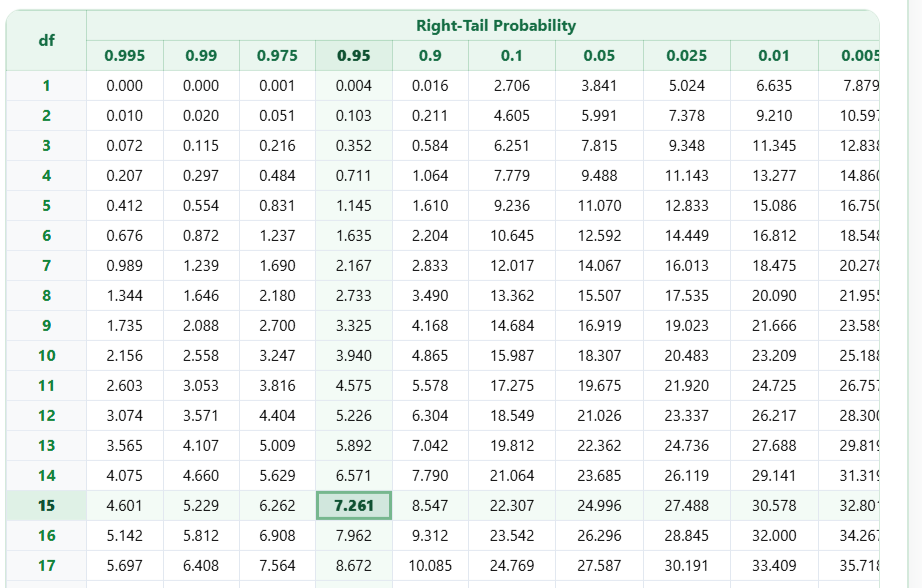
To locate the correct chi-square critical value from the table, find df = 15 in the first column and move across to the 0.95 probability column.
The value where the row and column meet is: χ² critical value = 7.261 (see the figure below). Therefore, the left-tailed chi-square critical value is: χ21-0.05, 15 = 7.261.
How to Find Two-Tailed Chi-Square Critical Values
A two-tailed chi-square problem requires two critical values:
- a lower critical value
- an upper critical value
The significance level is divided equally between the two tails.
Therefore:
α/2 is placed in each tail.
Since the table shows right-tail probabilities, use:
Lower critical value: 1 − α/2
Upper critical value: α/2
Unlike the normal or t distribution, the chi-square distribution is not symmetric. The lower and upper critical values are therefore not equally spaced around a center value.
Example 3. Two-Tailed Chi-Square Critical Values
A cereal manufacturer states that the population standard deviation of the weight of its cereal boxes is 4 grams. A quality-control analyst takes a random sample of 20 boxes and wants to determine whether the population standard deviation is different from 4 grams. The analyst uses α = 0.05.
Find the lower and upper chi-square critical values.
Solution
To find the required lower and upper chi-square critical values using the table, follow these steps:
Step 1: Identify the type of test and significance level.
The analyst wants to determine whether the standard deviation is different from 4 grams. The population variability could therefore be either lower or higher than the stated value. Therefore, this is a two-tailed test.
We also know that the significance level is: α = 0.05
Step 2: Convert α to the right-tail probabilities used by the table.
For a two-tailed test, divide α equally between the two tails. In this case, α/2 = 0.05/2
= 0.025
For the upper critical value, Right-tail probability = α/2 = 0.025
For the lower critical value, Right-tail probability = 1 − α/2
= 1 − 0.025
= 0.975
Therefore, we need the 0.975 and 0.025 columns.
Step 3: Find the degrees of freedom.
For a test involving one population variance or standard deviation, degrees of freedom, df = n − 1
The sample size, n = 20.
Therefore, df = 20 − 1
= 19
Step 4: Locate the critical values in the table.
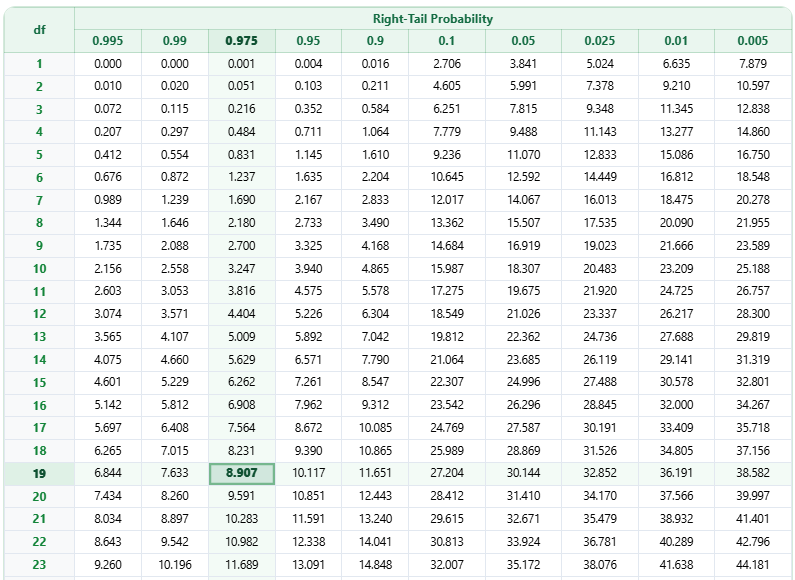
To locate the lower critical value, find df = 19 in the first column and move across to the 0.975 column. The two values meet at 8.907. Therefore, the lower critical value is: χ21-0.05/2, 19 = 8.907, as shown below.
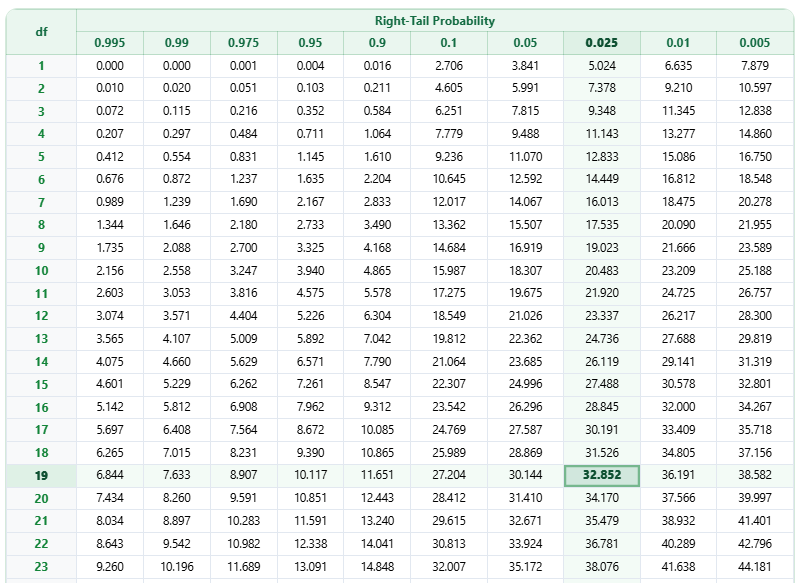
To locate the upper critical value, find the df = 19 row and move across to the 0.025 column. The two values meet at 32.852 (see the figure below). Therefore, the upper critical value for the test is: χ20.05/2, 19 = 32.852.
Which Chi-Square Critical Value Should You Use?
The correct tail depends on the alternative hypothesis and the type of statistical problem. The table below provides a quick summary of how to choose the correct type of tail for common chi-square tests.
| Statistical problem | Tail normally used |
|---|---|
| Chi-square goodness-of-fit test | Right-tailed |
| Chi-square test of independence | Right-tailed |
| Chi-square test of homogeneity | Right-tailed |
| Population variance greater than a stated value | Right-tailed |
| Population variance less than a stated value | Left-tailed |
| Population variance different from a stated value | Two-tailed |
| Confidence interval for a population variance or standard deviation | Two critical values |
Chi-Square Table vs. Chi-Square Critical Value Calculator
A chi-square table is useful when you are required to find a critical value by hand or want to understand how the value is obtained. However, the table only contains selected probabilities and degrees of freedom.
If the exact probability or df you need is not shown, use the Chi-Square Critical Value Calculator. It can find right-tailed, left-tailed, and two-tailed critical values for values that may not appear in the table.
If you are working with observed and expected frequencies rather than only looking for a critical value, use the Chi-Square Test Calculator or Chi-Square Goodness-of-Fit Calculator to perform the complete hypothesis test.
Frequently Asked Questions
A chi-square table is a statistical reference table used to find critical values from the chi-square distribution. You need the degrees of freedom and the appropriate probability to locate the correct value.
Yes. χ² is the statistical symbol for chi-square. A χ² table, X² table, x2 table, chi-square table, and chi-square distribution table generally refer to the same type of table.
First determine the degrees of freedom. For a right-tailed test, use the 0.05 column, find the required df row, and move across to the 0.05 column. The value where they meet is the chi-square critical value.
For a left-tailed test, convert α to a right-tail probability using 1 − α. For example, if α = 0.05, 1 − 0.05 = 0.95. Therefore, you would use the 0.95 column in a right-tailed chi-square table.
First, divide α by 2. Use 1 − α/2 to find the lower critical value and α/2 to find the upper critical value. For example, if α = 0.05, use the 0.975 column for the lower critical value and the 0.025 column for the upper critical value.
Yes. You can download the complete chi-square critical value table using the Download Chi-Square Table PDF button above the table. The PDF is useful when you want a copy for classwork, homework, revision, or exam practice.
