
How to Use the Trimmed Mean Calculator
This calculator allows you to calculate the trimmed mean of a dataset and shows you the steps. To use the calculator:
- Enter your data values into the input field. The calculator allows you to enter data manually or directly copy and paste values from Excel, Google Sheets, or text documents. For manual data entry, you should separate the values using commas, spaces, tabs, semicolons, or line breaks.
- Enter the Trim Percentage (%), such as 10 for a 10% trimmed mean.
- Click Calculate.
The calculator will instantly return the trimmed mean and provide you with a clear step-by-step solution showing how the trimmed mean was calculated.
What Is a Trimmed Mean?
A trimmed mean, also called the truncated mean, is a statistical measure of central tendency that finds the average of a dataset after discarding a predefined percentage of the smallest and largest values. Unlike the arithmetic mean, which uses all observations in the dataset, the trimmed mean excludes some values from both ends of the dataset, making the trimmed mean less sensitive to extreme values or outliers.
For example, consider the following dataset: 5, 6, 7, 8, 44. If we find the arithmetic mean, we get 14. However, this value is unreliable because the unusually large value of 44 pulls the mean upward. However, by calculating a 20% trimmed mean of the same dataset, we would remove the smallest value (5) and the largest value (44), hence eliminating the impact of the unusual observation. The remaining values are 6, 7, and 8, giving a trimmed mean of 7.
Therefore, the 20% trimmed mean is 7, compared with the arithmetic mean of 14.
Note: A 10% trimmed mean removes 10% of the observations from each end of the dataset, not 10% in total.
Trimmed Mean Formula
For a dataset containing n observations, the trimmed mean formula is:
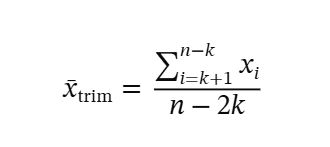
Where:
- x̄trim is the trimmed mean.
- xi represents each observation after sorting the data in ascending order.
- n is the total number of observations.
- k is the number of observations removed from each end.
- n − 2k is the number of observations remaining after trimming.
To determine the number of observations to remove from each end of the sorted data, we use the formula:
k = ⌊n × p/100⌋
Where:
- n is the number of observations.
- p is the trim percentage.
- ⌊ ⌋ means rounding down to the nearest whole number.
For example, suppose we have 20 observations, and we want to calculate a 10% trimmed mean. In this case, we can compute the number of observations to trim (k) as follows:
Number of observations to trim, k = ⌊20 × 10/100⌋
= ⌊2⌋
= 2
Therefore, we should remove the two smallest and two largest observations from the dataset before finding the mean of the remaining 16 observations.
How to Find the Trimmed Mean by Hand
To calculate the trimmed mean of a dataset manually, follow these steps:
- Sort the data in ascending order.
- Determine the number of values to trim (k) using the trim percentage.
- Remove k values from the bottom and top of the sorted data.
- Calculate the arithmetic mean of the remaining observations.
Example
Suppose a researcher records the time, in minutes, taken by 10 students to complete a task. The recorded times are:
15, 10, 20, 14, 17, 90, 12, 22, 16, 18
Find the 10% trimmed mean.
Solution
To find the 10% trimmed mean of the above data by hand, follow these steps:
Step 1: Sort the data in ascending order.
Sorting the given data from the smallest to the largest gives:
10, 12, 14, 15, 16, 17, 18, 20, 22, 90
Step 2: Determine the number of values to trim (k).
We calculate the number of values to remove from each end of the sorted dataset as follows:
k = ⌊n × p/100⌋
From the question, we know that:
- Number of observations, n = 10
- Trim percentage, p = 10%
Therefore, k = ⌊10 × 10/100⌋
= ⌊1⌋
= 1
This means we need to remove one observation from each end of the sorted data
Step 3: Remove k values from the bottom and top of the sorted data.
Removing the first and last observation from the sorted data, we get:
12, 14, 15, 16, 17, 18, 20, 22
Therefore, we have 8 observations remaining after trimming.
Step 4: Apply the trimmed mean formula.
Recall. To find the trimmed mean, we need to sum the remaining observations and divide by the number of observations after trimming.
In other words, the trimmed mean,
Substituting the values into the formula,
= 134/8
= 16.75
Therefore, the 10% trimmed mean is 16.75 minutes.
Want to calculate the ordinary mean without removing any observations? Use the Average Calculator.
Trimmed Mean vs. Arithmetic Mean
The trimmed mean and arithmetic mean are both measures of central tendency. However, they differ in how they handle extreme values.
The arithmetic mean includes every observation, including unusually large or small observations, when calculating the average. On the other hand, the trimmed mean removes a specified percentage of observations from both ends before calculating the average. This makes the trimmed mean a better choice when you want to find the mean of a dataset with outliers/influential values on both ends.
When to Use a Trimmed Mean
A trimmed mean is useful when you want to calculate an average while reducing the influence of unusually large or small observations.
Common applications include:
- Calculating average household incomes when a few households earn considerably more than the others.
- Finding the average time taken to complete a task when some observations are unusually high.
- Comparing average product prices when a dataset contains extremely expensive or cheap products.
- Summarizing experimental measurements that contain occasional extreme values.
Tip. You should always be careful when using a trimmed mean to handle a dataset with outliers because trimming removes observations without considering whether or not they are genuine outliers.
How to Calculate a Trimmed Mean in Excel
Microsoft Excel provides the TRIMMEAN function to help you quickly find the trimmed mean of a dataset, without having to master the manual method. The syntax is:
=TRIMMEAN(array, percent)
Where:
arrayis the range containing the data values.percentis the proportion of observations to remove from both ends combined.
For example, suppose your data values are in cells A1 to A10, and you want to calculate a 10% trimmed mean. We would compute the trimmed mean using the formula: =TRIMMEAN(A1:A10, 0.20)
Frequently Asked Questions
A trimmed mean calculator is a statistical tool that calculates the average of a dataset after removing a specified percentage of the smallest and largest observations. This calculator also provides a clear, step-by-step solution.
The general formula of a trimmed mean is: Trimmed Mean = Sum of Remaining Values / (n − 2k), where n is the number of observations and k is the number of values removed from each end.
To calculate a 10% trimmed mean, sort the data in ascending order, remove 10% of the observations from each end, and calculate the mean of the remaining values. Round down the number of observations removed from each end to a whole number.
A 20% trimmed mean is calculated by removing 20% of the smallest and 20% of the largest observations before finding the average.
The number of observations to remove from each end is rounded down to the nearest whole number. For example, if n = 12 and p = 10%, then k = ⌊1.2⌋ = 1. Therefore, one observation is removed from each end.
Yes. The trimmed mean equals the arithmetic mean when no observations are removed. The two measures may also have the same value for some datasets even when trimming is applied.
