
How to Use the Standard Error Calculator
This calculator will help you find the standard error from raw or summary data. It is useful when you want to know how precisely a sample mean estimates the true population mean.
To find the standard error using the calculator:
- Select the Data input type. The raw data option is appropriate when you have the original sample values. However, if you already have the sample standard deviation (s) and sample size (n), use the Summary Data option.
- Enter the data in the data input field.
- Click Calculate.
The calculator will instantly return the standard error of the mean and show you exactly how to find the answer, step-by-step.
Tip. When working with raw data, the calculator allows you to enter the values separated by commas, spaces, line breaks, or tabs. You can also paste values directly from Excel, Google Sheets, or text documents.
What Is Standard Error?
The standard error is a statistical measure that tells us how much the sample mean is expected to vary from the true population mean. A smaller standard error means the sample mean is likely to be a more precise estimate of the true population mean, whereas a larger standard error means there is more sampling variability.
Standard Error Formula
The standard error formula is: SE = s / √n
Where:
- SE is the standard error of the mean.
- s is the sample standard deviation.
- n is the sample size.
From the formula, it is clear that the standard error depends on the spread of the data and the sample size. Therefore, the standard error increases with an increase in sample standard deviation because the data values are more spread out. However, as the sample size increases, the standard error becomes smaller because larger samples provide more precise estimates of the population mean.
How to Calculate Standard Error by Hand
To calculate the standard error manually, follow these steps:
- Find the sample standard deviation (s)
- Find the sample size (n)
- Apply the standard error formula
Example 1. Raw Data
A researcher records the weekly exercise hours for a sample of 5 adults. The values are: 12, 15, 17, 19, 22. Find the standard error.
Solution
To find the standard error manually, follow these steps:
Step 1: Find the sample standard deviation, s.
By definition, the sample standard deviation formula is:
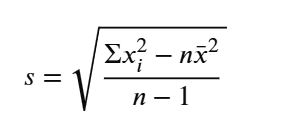
Where:
- s is the sample standard deviation.
- xi is each individual data value.
- Σxi² is the sum of the squared values.
- x̄ is the sample mean.
- n is the total number of values in the sample.
Thus, to find the sample standard deviation for our data, we need to find all the unknowns in the above formula as follows:
i) Find the sum of squared values, Σxi2
Σxi2 = 122 + 152 + 172 + 192 + 222
= 144 +225 +289 + 361 + 484
= 1503
ii) Find the sample mean, x̄
By definition, the sample mean formula is: x̄ = Σxi/n
Therefore, x̄ = (12 + 15 + 17 + 19 + 22)/5
= 85/5
=17
Alternatively, you can use the mean calculator to quickly find the sample mean for this data.
iii) Find the sample standard deviation
Substituting x̄ = 17, n = 5, and Σxi2 = 1503 into the sample standard deviation formula, we get:
s = √[(1503 − 5 (17)2) / (5− 1)]
= √[(1503 − 1445) / 4]
=√14.5
s = 3.8079
You can also verify the above result using the standard deviation calculator.
Step 2: Find the sample size, n.
The dataset contains 5 observations. Thus, n = 5
Step 3: Apply the standard error formula.
Recall. The standard error formula is: SE = s / √n
Substituting the values, we get:
SE = 3.8079/√5
=1.7029
Therefore, the standard error, SE = 1.7029. This means the sample mean typically varies by about 1.7029 hours from the true population mean.
Example 2. Summary Data
A researcher wants to estimate the average blood pressure of adults in a town. A random sample of 36 adults has a sample standard deviation of 9.6 mmHg. Find the standard error.
Solution
To find the required standard error manually, follow these steps:
Step 1: Find the sample standard deviation, s.
From the question, the sample standard deviation, s = 9.6
Step 2: Find the sample size, n.
We know that the sample contains 36 adults. Therefore, n = 36
Step 3: Apply the standard error formula.
By definition, the standard error formula is: SE = s / √n
Substituting the values into the formula, SE = 9.6 / √36
= 9.6 / 6
= 1.6
Therefore, the standard error is 1.6. This implies that the sample mean typically varies by about 1.6 mmHg from the true population mean.
Standard Error vs Standard Deviation
Standard error and standard deviation are related, but they are not the same. While the standard deviation measures how spread out the individual data values are from the mean, the standard error measures how much the sample mean is expected to vary from the true population mean.
The table below provides a quick summary of the main differences between standard error and the standard deviation.
| Measure | What it describes | Formula |
|---|---|---|
| Standard deviation | Spread of individual values | s |
| Standard error | Precision of the sample mean | SE = s / √n |
Frequently Asked Questions
This calculator finds the standard error from raw data or summary data and provides a clear, step-by-step solution showing you how to find the standard error using your own data.
The standard error of the mean formula is: SE = s / √n, where SE is the standard error, s is the sample standard deviation, and n is the sample size.
Yes. Select the Raw Data option, enter your sample values, and click Calculate. The calculator will count the sample size, calculate the sample standard deviation, and then find the standard error.
No. The standard deviation measures the spread of individual data values, whereas the standard error measures the precision of the sample mean.
Standard error gets smaller as sample size increases because the formula divides the sample standard deviation by √n. Larger samples usually provide more precise estimates of the population mean.
