
How to Use the Pearson Correlation Test Calculator
This calculator tests whether the pearson’s correlation coefficient is statistically significant. To use the calculator:
- Enter or paste the values for the first variable into the X Values field.
- Enter or paste the corresponding values for the second variable into the Y Values field.
- Select the alternative hypothesis.
- Enter the significance level, α.
- Select the number of decimal places.
- Click Calculate.
The calculator computes Pearson’s correlation coefficient from the data and then performs the complete hypothesis test. It returns r, the t statistic, degrees of freedom, p-value, critical r value, decision, and conclusion.
If you only need to calculate and interpret Pearson’s r, use the correlation coefficient calculator instead.
Note. The X and Y fields must contain the same number of observations because each X value must be paired with its corresponding Y value. Additionally, the calculator allows you to enter the values manually or copy-paste directly from Excel, Google Sheets, or text documents. For manual data entry, you should separate the values manually using commas, spaces, tabs, or line breaks.
What Is a Pearson Correlation Test?
A Pearson correlation test is a hypothesis test used to determine whether there is sufficient statistical evidence of a linear correlation between two quantitative variables in the population.
Pearson’s correlation coefficient, r, describes the strength and direction of the linear relationship in the sample. However, an observed sample correlation does not automatically mean that a linear correlation exists in the population.
The correlation test uses r and the sample size to calculate a t statistic and p-value. The p-value is then compared with the significance level to determine whether the observed correlation is statistically significant.
Hypotheses for a Pearson Correlation Test
The hypotheses for a Pearson correlation test are stated in terms of the population correlation coefficient, ρ. The alternative hypothesis varies depending on the type of test.
The hypotheses are:
Two-tailed test:
- Null hypothesis, H₀: ρ = 0. There is no linear correlation between the two variables in the population.
- Alternative hypothesis, H₁: ρ ≠ 0. There is a linear correlation between the two variables in the population.
Right-tailed test:
- Null hypothesis, H₀: ρ = 0. There is no linear correlation between the two variables in the population.
- Alternative hypothesis, H₁: ρ > 0. There is a positive linear correlation between the two variables in the population.
Left-tailed test:
- Null hypothesis, H₀: ρ = 0. There is no linear correlation between the two variables in the population.
- Alternative hypothesis, H₁: ρ < 0. There is a negative linear correlation between the two variables in the population.
In most correlation problems, use a two-tailed test unless the question or hypothesis specifically states that the expected correlation is positive or negative.
Test Statistic Formula
The test statistic formula for testing whether the correlation coefficient is statistically significant is:
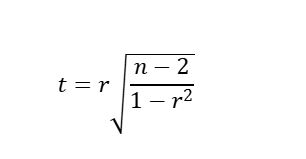
Where:
- t is the test statistic
- r is Pearson’s sample correlation coefficient
- n is the number of paired observations
The degrees of freedom are: df = n − 2, where n is the number of paired observations. After calculating the t-statistic, we use the t-distribution to find the corresponding p-value.
If you already know r and n and only need the corresponding p-value, use the p-value from r calculator.
How to Perform a Correlation Test by Hand
A Pearson correlation hypothesis test can be completed in the following six steps:
- State the null and alternative hypotheses.
- Set the significance level.
- Calculate the test statistic.
- Find the p-value and critical value.
- Make the statistical decision.
- State the conclusion in the context of the problem.
Example
A researcher wants to determine whether daily recreational screen time is significantly correlated with the number of hours college students sleep per night.
The following data were collected from 12 students.
| Student | Screen Time, X (hours) | Sleep, Y (hours) |
|---|---|---|
| 1 | 1 | 8.4 |
| 2 | 2 | 7.9 |
| 3 | 3 | 7.8 |
| 4 | 4 | 6.7 |
| 5 | 5 | 8.6 |
| 6 | 6 | 8.2 |
| 7 | 7 | 7.3 |
| 8 | 8 | 7.7 |
| 9 | 9 | 7.3 |
| 10 | 10 | 6.7 |
| 11 | 11 | 7.3 |
| 12 | 12 | 6.5 |
At the 0.05 significance level, test whether there is a statistically significant linear correlation between daily recreational screen time and sleep duration.
Solution
To perform the hypothesis test, follow these steps:
Step 1: State the hypotheses
The question asks whether the variables are correlated but does not specify a positive or negative direction. Therefore, we use a two-tailed test.
The hypotheses are:
- H₀: ρ = 0 (There is no linear correlation between daily recreational screen time and sleep duration in the population).
- H₁: ρ ≠ 0 (There is a linear correlation between daily recreational screen time and sleep duration in the population).
Step 2: Set the significance level
We want to test the hypothesis at the 0.05 significance level. Hence, α = 0.05
Step 3: Calculate the test statistic
Recall. The test statistic for Pearson’s correlation is:
Using the paired data, the calculator gives:
- r = −0.635234
- n = 12
If you want to verify the value of r or see how it is calculated from the raw data, use the correlation coefficient calculator.
Substituting the values into the test statistic formula, we get:
t = −0.635234√[10 / (1 − 0.403523)]
= −0.635234√(10 / 0.596477)
= −2.600979
Therefore, the test statistic is: t = −2.600979
The degrees of freedom are: df = n − 2
= 12 − 2
= 10
Therefore, df = 10.
You can also use the degrees of freedom calculator to find the degrees of freedom for Pearson correlation and other statistical tests.
Step 4: Find the p-value and critical value
Since H₁: ρ ≠ 0, we need a two-tailed p-value.
Using t = −2.600979 and df = 10, the two-tailed p-value can be found in Excel using: =T.DIST.2T(ABS(-2.600979),10)
This gives: p = 0.026447. Therefore, p-value = 0.026447. You can verify this result using the p-value from r calculator.
Want to use the critical value instead? Use a correlation critical value table and look up α = 0.05 with n = 12 in the two-tailed table. You may also find the critical value using the r critical value calculator.
Both methods return: Critical r = ±0.575983
Step 5: Make the decision
P-value method: Since the p-value (0.026447) is less than the 0.05 significance level, we reject the null hypothesis (H₀).
Critical value method: Since the absolute value of the correlation coefficient (|r| = 0.635234) is greater than the absolute critical value (0.575983), we reject the null hypothesis (H₀).
Step 6: State the conclusion
At the 0.05 significance level, there is sufficient evidence of a statistically significant linear correlation between daily recreational screen time and sleep duration.
Also, since r = −0.635234, the sample shows a negative relationship. Therefore, students with more recreational screen time generally tended to report fewer hours of sleep.
Correlation Coefficient r vs. Correlation Test
Pearson’s r and the Pearson correlation test answer different questions. While Pearson’s correlation coefficient (r) tells you the strength and direction of the linear relationship in the sample, the Pearson correlation test goes one step further and asks whether the observed sample correlation provides sufficient evidence of a linear correlation in the population.
Assumptions of the Pearson Correlation Test
Before performing a Pearson correlation test, check that the data are appropriate for Pearson’s method.
The main considerations are:
- The two variables should be quantitative.
- Each X value should be paired with the corresponding Y value.
- The relationship should be approximately linear.
- Extreme outliers should not dominate the relationship.
- The observations should be independent.
A scatter plot maker can help you examine the form and direction of the relationship and identify unusual observations before performing the test.
Frequently Asked Questions
A Pearson correlation test calculator is an online tool that tests whether the linear correlation between two quantitative variables is statistically significant. It calculates Pearson’s r, t statistic, degrees of freedom, p-value, critical r value, decision, and conclusion from paired X-Y data.
The null hypothesis is H₀: ρ = 0. This states that there is no linear correlation between the two variables in the population.
For a two-tailed test, the alternative hypothesis is H₁: ρ ≠ 0. However, for directional tests, it may be H₁: ρ > 0 or H₁: ρ < 0.
Use a two-tailed test in most cases. However, if the research question or hypothesis specifies the expected direction of the correlation before the data are analyzed, use a one-tailed test.
A correlation is statistically significant when the p-value is less than the selected significance level. For example, if α = 0.05 and p = 0.03, reject H₀ and conclude that there is sufficient evidence of a statistically significant linear correlation.
